


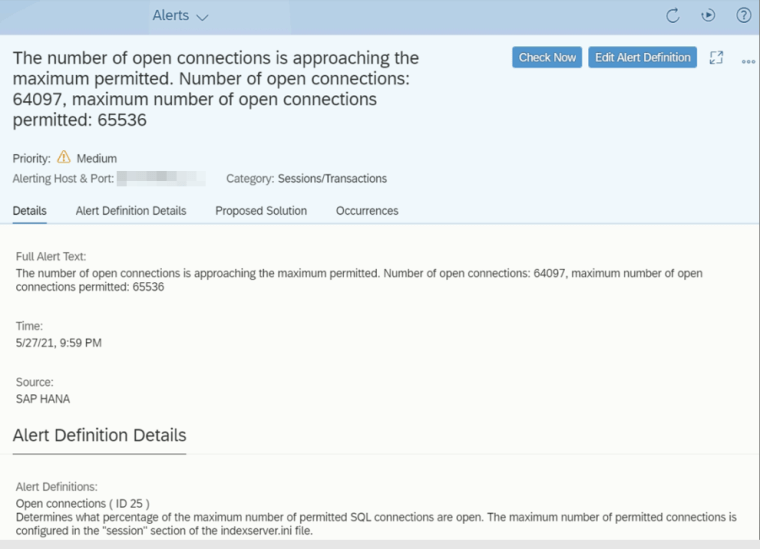
You are receiving below alerts from the SAP Cockpit of one of the SAP HANA database.
The number of open connections is approaching the maximum permitted.
Number of open connections: 64097, maximum number
of open connections permitted: 65536
Open connections (ID 25)
Determines what percentage of the maximum number of permitted SQL connections are open.
The maximum number of permitted connections is configured in the "session" section of the indexserver.in file
Solution
The solution is discussed in the SAP Note 1910159 – How to handle HANA Alert 25: ‘Check number of connections’.
Method 1
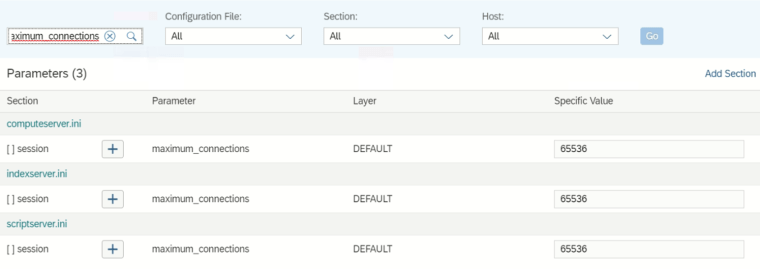
(Recommended) Increase the “maximum_connections” value. (Below screenshot is taken from the SAP Cockpit)
Method 2
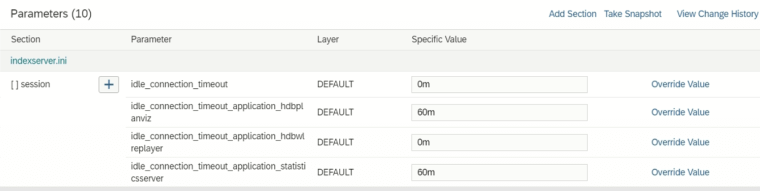
Set the value of “idle_connection_timeout” other than 0. The idle connections will not be disconnected if the value is set to 0.
Note: Value 0 is the default and recommended number set by SAP. You may change the parameter for any specific cases / urgent fix issues.
Method 3
Manually kill or disconnect any idle (long) connections.
Use the following command to list out the long idle connections in your system. Sort the idle time beyond the threshold value.
select * from "SYS"."M_CONNECTIONS" where "CURRENT_SCHEMA_NAME" = 'YOUR-SCHEMA-NAME' and "CONNECTION_STATUS" = 'IDLE'
The kill the idle connection with below command,
ALTER SYSTEM DISCONNECT SESSION [THE-CONNECTION-ID]
Alternatively, you can check the table “_SYS_STATISTICS”.”HOST_LONG_IDLE_CURSOR” to get the idle connection list.


