


You are getting below error message while executing some transaction codes in SAP system.
“Skip Initial Screen” is not permitted for transaction

Solution
The error occurred is mainly due to activation of parameter dynp/checkskip1screen.
Information on the parameter,
Parameter Description
You can use this parameter to activate the client-specific check of whether it is permissible to start a transaction with the “Skip Initial Screen” option. This check is only performed if the transaction is started using a shortcut (SAP GUI for Windows), start transaction (SAP GUI for Java), or using a URL (SAP GUI for HTML).OFF
The check is deactivated for all clients, that is, the start option “Skip Initial Screen” is permitted in all clients.ALL
The check is activated in all clients, that is, the start option “Skip Initial Screen” is essentially not permitted in all clients. All transactions that are entered in client-dependent table TSTCS are exceptions to this.
There are 2 solution here,
1. Set OFF to parameter dynp/checkskip1screen. This will deactivate the parameter.
2. Use transaction code SE16 and open V_TSTCS view. From here, you can maintain / white-list any external transaction start with “Skip First Screen” allowed.
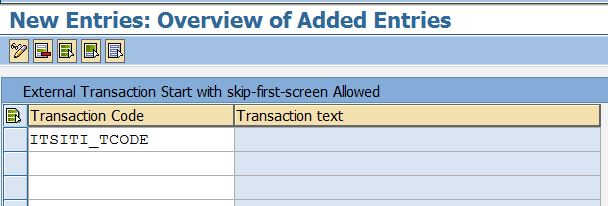
Note
- The table V_TSTCS is client-specific, which means that the transaction must be entered in each affected client.
- SAP Help
- SAP Note 2562022 – Error during execution of work item – “Skip Initial Screen” is not permitted for transaction


