


You can follow the following methods to check if the indexes are exist in the table. All the steps below are based on Microsoft SQL Server Management Studio (using the command line and GUI – Object Explorer)
Command Line
Source: https://stackoverflow.com/questions/2735963/how-can-we-check-that-table-have-index-or-not
- Command line 1
SELECT * FROM sys.indexes WHERE object_id =
(select object_id from sys.objects WHERE NAME = 'TABLE-NAME')
- Command line 2
SELECT
    sys.tables.name,
    sys.indexes.name,
    sys.columns.name
FROM sys.indexes
    INNER JOIN sys.tables ON sys.tables.object_id = sys.indexes.object_id
    INNER JOIN sys.index_columns ON sys.index_columns.index_id = sys.indexes.index_id
        AND sys.index_columns.object_id = sys.tables.object_id
    INNER JOIN sys.columns ON sys.columns.column_id = sys.index_columns.column_id
        AND sys.columns.object_id = sys.tables.object_id
WHERE sys.tables.name = 'TABLE-NAME'
ORDER BY
    sys.tables.name,
    sys.indexes.name,
    sys.columns.name
- Command line 3
select object_name(object_id),* from sys.indexes
where object_name(object_id) = 'TABLE-NAME'
GUI
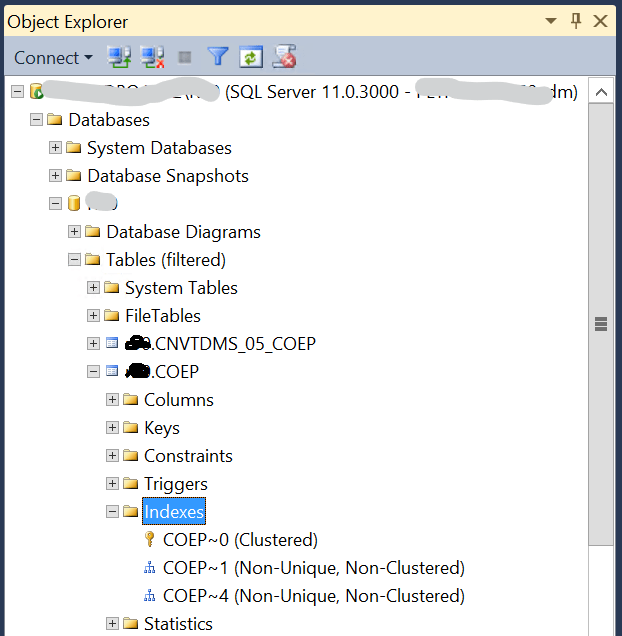
Drill down from Database > Tables > Indexes. From here, you will see the available indexes.


nice article